Showing posts with label ANDROID LAUNCHER. Show all posts

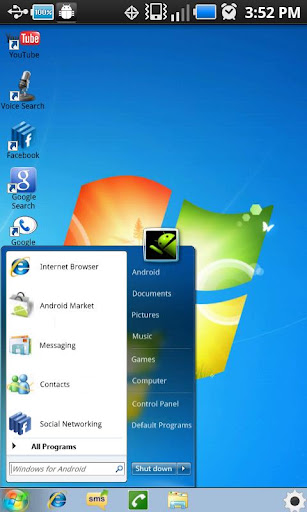
Windows 7 v1.6 Apk


Windows 7 v1.6 Apk | 1.4 MB | Mediafire | Howfile
Requires Android:2.0.1 and up

You can now emulate Windows 7 on your Android device. This home application can replace the default home application (if desired) and allows you to access anything on your phone through Windows 7 for Android.

v1.6 update:
- Fixed the issue with some buttons force closing.

Note: If you have a Motorola Phone with Motoblur please download "Moto Home Fix" by Nightshade Labs to choose the home application.

If music player still does not function download this application: "Android Music Player" by "JRTSTUDIO"

Download Or Download

Download - Market

Full Screen Launcher Pro v1.6.5 Apk


Full Screen Launcher Pro v1.6.5 Apk | 587 KB | HowFile / Mediafire
Requires Android:2.2 and up

The Full Screen Launcher is a replacement home screen for your android Device. This 3D launcher will give you unlimited space on your phone home screen and quick access to your contacts and applications.

v1.6.5 update:
- fixed bug for HTC Desire and other HTC devices
- fixed black borders on the background when zooming in/out

--== Features ==--
- 3D wall : the desktop becomes a big wall with OpenGL ultra smooth scrooling
- Coll animation when switching walls
- Widget support : widget dropped on the desktop are converted to 3D and shown back in 2D when needed (tested with Facebook, Calendar, power and weather widgets...)
- Full Screen Caller ID integration : drop HD picture of your favorite contacts for easier access.
- Folder : Unclutter your home screen with folders. Each folder is displayed as a new wall and can contains widgets, application icons, contacts.
- Wallpaper support : when zooming inside your wall, the android wallpaper zoom
- Live Wallpaper support

--== How to use ==--
Press your home button to select the Full Screen Launcher as the default launcher.
The first use will render textures into cache, this might slows down the application.
To add widget, shortcuts or contacts to your home screen, simply long press the desktop.
All items can be picked with a long press.
To create folder, long press the desktop and choose add folder. You can now drop any items in your new folder. Folders are shown on the home screen as a 3D cube previewing the content of the folder.

Download Or Download

Download- @ Market

Claystone Launcher v1.18 Apk


Claystone Launcher v1.18 Apk | 3.2 MB | Mediafire
Requires Android:2.1 and up

Claystone Labs is making Android the easiest smartphone to use, bar none. With Claystone, we’ve worked hard to develop a launcher that allows you to not only access and discover outstanding content, but also enjoy it within our innovative panel-based navigation system.

v1.18 change log:
- Introduced 2 new themes - Serenity and Transparent - unlockable via Facebook/Twitter activation message
- Resolved issues affecting YouTube shortcuts
- Revised YouTube feed list
- Resolved issues re: unexpected behavior from back button when in full-screen mode
- Stability enhancements
- Misc. interface updates

Download

Claystone Launcher v1.18 Apk


Claystone Launcher v1.18 Apk
Size : 3.2 MB
Requires Android:2.1 and up
Android Market Link - Visit
Developer - Visit


v1.18 change log:
- Introduced 2 new themes - Serenity and Transparent - unlockable via Facebook/Twitter activation message
- Resolved issues affecting YouTube shortcuts
- Revised YouTube feed list
- Resolved issues re: unexpected behavior from back button when in full-screen mode
- Stability enhancements
- Misc. interface updates

Claystone Labs is making Android the easiest smartphone to use, bar none.
With Claystone, we’ve worked hard to develop a launcher that allows you to not only access and discover outstanding content, but also enjoy it within our innovative panel-based navigation system.

A New Way to Navigate Android
Claystone's home screen experience is designed around panels of content that are grouped and organized into stacks. By tapping the stack icon in the middle of the launch bar, you’re presented a 3D overview of your open panels that allows you to easily navigate amidst a wealth of integrated media, including: photos, videos, news feeds, and more.

With Claystone, we’ve done our best to ensure Android users spend less time switching being apps and more time enjoying their content.

Claystone: Customized
In addition to our exclusive navigation system and top-tier content, we’ve also designed Claystone to be configurable to your interests.

By pressing your device’s ‘Menu’ button and tapping ‘Preferences’, you’ll have immediate access to a host of customization options, setting everything from the # of YouTube search results to the speed in which panel animations occur on-screen.


Download

Regina 3D Launcher Pro v1.2.0 Apk


Regina 3D Launcher Pro v1.2.0 Apk | 2.6 MB | Mediafire | FileSonic
Requires Android:2.1 and up

Now create folders, in your workspace and even in folders.16 shortcuts is maximum capacity for each folder.And navigate folders with more fun.

v1.2.0 update:
1. (add) New workspace browser transition effect is added for pro version.
2. (fix) Fixed several problems causing re-initialization.
3. (add) Simple base margin(blue color)for wide screen device
4. (change) Removed margin of shortcut and widgets.
5. (change) Application name has been changed from "Regina Todo" to "Regina to-do list"

Regina Pro will let you create more than 5 folders in total while the Free version will allow you to create up to 5 folders.
This version will be available for (KRW)3,450, which is a little less then $3 for a limited time.
Please contact reginaui@gmail.com for refunds with [Refund] header in the subject.

[Notes]
- Regina Launcher is a 'Home Replacement Application'. So you won't be able to see Regina Launcher if there is any default launcher already. In this case, please dismiss the previous default launcher in application setting menu.
- Because Regina 3D Launcher is pure 3D graphics, your device must have a decent graphics chip to gain usable performance.
- After installation, select "Version x.x.x" item in Regina Settings menu and update all app in list.
- Supports Eclair, Froyo, Gingerbread and tested on Galaxy Tab too.
- Live Wallpaper is not supported because of performance issue.
- You may face frequent re-initialization if there is not enough memory(RAM) remaining. Please reboot your device in this case.


Regina 3D Launcher is a 'Home Replacement Application' which uses pure 3D graphics showing various dynamic 3D effects for your pleasure.
Browsing workspaces, creating shortcuts, browsing into folders, and removing widgets have gotten a little bit more fun.

* Highlighted Features
- Intuitive 3D workspace browser
- Separate wallpaper for each workspace
- Secret workspaces where you can hide some of your app shortcuts and widgets for your privacy
- Regina widgets (full 3D widgets)
- All widgets and shortcuts can be positioned freely without much restrction in workspaces
- Uninstall apps from workspace directly
- Create folders(also live folders) in folders
- Various visual effects

Video demo of Regina Launcher can be found on YouTube
http://www.youtube.com/watch?v=V-tobcffCR8

We are receiving more emails than we can handle. We are very flattered about this fact because it means we are getting attention. We thank all the users.

But please visit our facebook page(http://www.facebook.com/pages/Regina-3D-Launcher/200100660029694) for aksing questions and sharing information instead of mailing to us. That will help us a lot and save us more time for us to work on the Launcher.

Download Or Download

Download - Market

iLauncher v2.1.0.7 (Full) Apk


iLauncher v2.1.0.7 (Full) Apk | 993 KB | Mediafire | Multiupload
Requires Android:2.1 and up

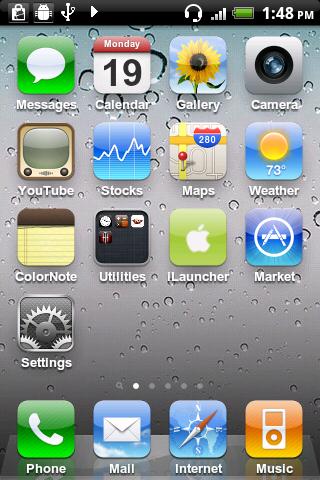
iPhone style home screen launcher. This is an iPhone style home screen launcher. The launcher makes your phone work just like a real iPhone.

v2.1.0.7 update:
- Hot fix for the folder bug
v2.1.0.6
- Fixed a crash on 'Restore hidden apps' menu
- Fixed the problem that 'Export icons' didn't work
- Fixed the problem that the icon blinks one time after moving it.
- Tried to fix some crashes that never occurs on my device.

** This is NOT a fake screen nor an icon pack. **

- Smooth scrolling.
- Icons have rounded corners and gloss effects.
- Long touch icons to move them around and position them as you like.
- Supports a customizable dock-bar.
- Easily uninstall apps from your home screen.
- Press the back hardware key to exit edit mode.
- Spotlight search

This version aims to replicate the home screen functions provided by iOS 3. Features that are not supported in the current version will eventually be supported in later 1.x versions. Features available on iOS 4 and later are planned to be supported in version 2.0.

Tested with HTC Legends, Galaxy S, Nexus One, HTC Desire.

Download Or Download

Download - Market

GO Launcher EX 2.75 Final Apk


GO Launcher EX 2.75 Final Apk | 4.3 MB | Mediafire
Requires Android:2.0 and up

GO Launcher is a highly customizable home repalcement application, one of the most popular home apps in Android Market, which will run when you press your android phone’s HOME key.GO Launcher EX supports hundreds of themes, fast flip speed and tons of useful functions.

v2.75 update:
1. (New) Delete folders automatically when no icons inside
2. (Improve) Change content arrangement of version instruction
3. (Improve) Change the function buttons of theme preview page
4. (Fix) Now notification supports new version Gmail app and Android 4.0
5. (Fix) Shaking error of clicking menu buttons

Features:
- Hundreds of themes
- Fancy home screen transition
- Smooth scrolling experience
- Icon popup menu
- Folder and task manager in app drawer
- Gesture supported
- Scrollable & resizable widgets supported

Fixed:
- Add shortcut of GO Launcher (Long press home screen-Shortcut- GO Launcher).
- Synchronize home folder and app draw folder.
- Directly drag to change app icon on dock bar.
- Directly open folder on dock bar.
- Add 3D transition for vertical continuous scrolling (MENU-Preferences-Effects Settings-Vertical scroll effect).
- Support single screen wallpaper (MENU-Preferences-Screen Settings-Normal/Portrait Wallpaper).

Download
GO Launcher EX v2.75 Final Apk


GO Launcher EX v2.75 Final Apk
Size : 4.3 MB
Requires Android:2.0 and up
Android Market Link - Visit
Developer - Visit


v2.75 change log:
1. (New) Delete folders automatically when no icons inside
2. (Improve) Change content arrangement of version instruction
3. (Improve) Change the function buttons of theme preview page
4. (Fix) Now notification supports new version Gmail app and Android 4.0
5. (Fix) Shaking error of clicking menu buttons

Extended version of GO Launcher, one of the most popular home application.
GO Launcher is a highly customizable home repalcement application, one of the most popular home apps in Android Market, which will run when you press your android phone’s HOME key.
GO Launcher EX supports hundreds of themes, fast flip speed and tons of useful functions.

Features:
- Hundreds of themes
- Fancy home screen transition
- Smooth scrolling experience
- Icon popup menu
- Folder and task manager in app drawer
- Gesture supported
- Scrollable & resizable widgets supported

Fixed:
- Add shortcut of GO Launcher (Long press home screen-Shortcut- GO Launcher).
- Synchronize home folder and app draw folder.
- Directly drag to change app icon on dock bar.
- Directly open folder on dock bar.
- Add 3D transition for vertical continuous scrolling (MENU-Preferences-Effects Settings-Vertical scroll effect).
- Support single screen wallpaper (MENU-Preferences-Screen Settings-Normal/Portrait Wallpaper).

Tips:
1. Pinch fingers to enter preview screen and edit home screen pages
2. Search “go launcher theme” to get themes and select them in “Themes preferences”
3. Set screen transition and flip speed in “Display settings”
4. Long press icons on home screen to active popup menu
5. Long press icons in app drawer to edit location, uninstall apps and create folders
6. If you can't set GO Launcher as your default home, download "Home manager"

Important:
1. This is a totally free application and we need directly call phone numbers permission to enable the direct dial shortcut on home screen.
2. We will bring out some charged apps like themes and widgets, but most of our apps are free!
3. The weather and clock widget in screenshots belongs to GO Weather, one of the applications developed by our team!
4. The other widgets in screenshots are our GOwidgets, try to search and download them in Android Market!
5. Download our “Classic Theme GO Launcher EX” to get the wallpaper!
6. GO Dev team has released GO Launcher EX, GO SMS, GO Weather and GO Contacts. More and more applications are coming soon!
Think of an extreme makeover to your phone? Try this out!


Download Or Download

iLauncher v2.1.0.5 (Full) Apk


iLauncher v2.1.0.5 (Full) Apk | 993 KB | Mediafire
Requires Android:2.1 and up

iPhone style home screen launcher. This is an iPhone style home screen launcher. The launcher makes your phone work just like a real iPhone.

v2.1.0.5 update:
- Support Spanish ( thanx to Zelu House)
- Fixed the bug which took too much time on loading.
- 'Importing Icons' now apply customized icons and customized title immediately before rebooting.
- Fixed the bug sometimes icons were not rendered on their proper position.
- Fixed the bug that folder list in 'Manage Folder' didn't show up some folders when iLauncher icon was inside a folder.
- Fixed some crashes, minor bugs.

** This is NOT a fake screen nor an icon pack. **

- Smooth scrolling.
- Icons have rounded corners and gloss effects.
- Long touch icons to move them around and position them as you like.
- Supports a customizable dock-bar.
- Easily uninstall apps from your home screen.
- Press the back hardware key to exit edit mode.
- Spotlight search

This version aims to replicate the home screen functions provided by iOS 3. Features that are not supported in the current version will eventually be supported in later 1.x versions. Features available on iOS 4 and later are planned to be supported in version 2.0.

Tested with HTC Legends, Galaxy S, Nexus One, HTC Desire.

Download

Download - Market

SPB Shell 3D v1.5.2 + patch Apk


SPB Shell 3D v1.5.2 + patch Apk | 9.2 MB MB | Multiupload
Requires Android:2.1 and up

SPB Shell 3D: next generation user interface. Enjoy your phone! If you are not able to launch SPB Shell 3D, please use “Home Switcher” application from Android Market.

V1.5.2 update:
# Tablet support
# Android 3.x and 4.x support
# Improved performance
# Other bugfixes

To launch SPB Shell 3D press the Home button once installation is completed.

Features:
3D Home screen/launcher
Smart folders
3D widgets
Collection of panels and widgets

Install/Register note:
1. Install SPB Shell 3D, Don't open
2. Install LuckyPatcher
3. Run the LuckyPatcher, long press SPB Shell 3D, choose Lucky Google Market Patch
4. Done

Download

Download - Market

Full Screen Launcher Pro v1.6.4 Apk


Full Screen Launcher Pro v1.6.4 Apk | 587 KB | Multiupload / HowFile
Requires Android:2.2 and up

The Full Screen Launcher is a replacement home screen for your android Device. This 3D launcher will give you unlimited space on your phone home screen and quick access to your contacts and applications.

v1.6.4 update:
- Improved GFX when moving and resizing items
- Fixed FC when updating application

--== Features ==--
- 3D wall : the desktop becomes a big wall with OpenGL ultra smooth scrooling
- Coll animation when switching walls
- Widget support : widget dropped on the desktop are converted to 3D and shown back in 2D when needed (tested with Facebook, Calendar, power and weather widgets...)
- Full Screen Caller ID integration : drop HD picture of your favorite contacts for easier access.
- Folder : Unclutter your home screen with folders. Each folder is displayed as a new wall and can contains widgets, application icons, contacts.
- Wallpaper support : when zooming inside your wall, the android wallpaper zoom
- Live Wallpaper support

--== How to use ==--
Press your home button to select the Full Screen Launcher as the default launcher.
The first use will render textures into cache, this might slows down the application.
To add widget, shortcuts or contacts to your home screen, simply long press the desktop.
All items can be picked with a long press.
To create folder, long press the desktop and choose add folder. You can now drop any items in your new folder. Folders are shown on the home screen as a 3D cube previewing the content of the folder.

Download Or Download

Download- @ Market

iLauncher v2.1.0.4 (Full) Apk


iLauncher v2.1.0.4 (Full) Apk | 993 KB | Mediafire
Requires Android:2.1 and up

iPhone style home screen launcher. This is an iPhone style home screen launcher. The launcher makes your phone work just like a real iPhone.

v2.1.0.4 update:
- Fixed the bug that all icons in a folder disappeared when managing folders through the iLauncher menu.

** This is NOT a fake screen nor an icon pack. **

- Smooth scrolling.
- Icons have rounded corners and gloss effects.
- Long touch icons to move them around and position them as you like.
- Supports a customizable dock-bar.
- Easily uninstall apps from your home screen.
- Press the back hardware key to exit edit mode.
- Spotlight search

This version aims to replicate the home screen functions provided by iOS 3. Features that are not supported in the current version will eventually be supported in later 1.x versions. Features available on iOS 4 and later are planned to be supported in version 2.0.

Tested with HTC Legends, Galaxy S, Nexus One, HTC Desire.

Download

Download - Market

Nemus Launcher v1.5.2 Apk


Nemus Launcher v1.5.2 Apk | 1.1 MB | Mediafire Download
Requires Android:2.1 and up

A Home replacement Application with Low memory usage, Quick response, Easy App finding/management, Easy Workspace management, Easy Folder management.

v1.5.2 update:
- Add : New UI for string translation volunteers
- Add : SSKIN theme support for Galaxy Nexus
- Improve : Dragging an item out of applist folder
- Fix : Bugs reported from end users

Download

Nemus Launcher v1.5.2 Apk


Nemus Launcher v1.5.2 Apk
Size : 1.1 MB
Requires Android:2.1 and up
Android Market Link - Visit
Developer - Visit


v1.5.2 change log:
- Add : New UI for string translation volunteers
- Add : SSKIN theme support for Galaxy Nexus
- Improve : Dragging an item out of applist folder
- Fix : Bugs reported from end users

A Home replacement Application with
- Low memory usage
- Quick response
- Easy App finding/management
- Easy Workspace management
- Easy Folder management

NEW ! (v1.1)
- Hide App
- Lock Workspace(Screen) / Application
- Quick Setting from Dock (flick-up)

Features:
- 1 to 9 workspaces
- 2 App menu(drawer) styles : 1. vertical 2. horizontal paged view
- Expandable folders
- Workspace and app menu switchers (screen preview)
- Highlight recently used apps
- Scrollable bottom docks / QuickSetting docks
- Scrollable widgets
- App-Hide&Lock / Screen-Lock

Working On:
- Themes
- Backup/Restore/Share settings
- More application menu styles

Note:
- If you can't run or find NemusLauncher after install, try home switcher.
https://market.android.com/details?id=ymst.android.homeswitcherfroyo
- "DIRECTLY CALL PHONE NUMBERS" permission is need to make Direct Dial Shortcut.


Download

GO Launcher EX 2.73 Final Apk


GO Launcher EX 2.73 Final Apk
Size : 4.3 MB
Requires Android:2.0 and up
Android Market Link - Visit
Developer - Visit


v2.73 change log:
1. (New) Apps update notification in app drawer (there is an option in app drawer settings)
2. (New) Add a new wallpaper in GO wallpaper option
3. (Improve) More sensitive of GO Store tabs when sliding the app list
4. (Improve) More realistic effect of dragging and moving icons on home screen
5. (Fix) Make great efforts to fix icon and margin errors on pads

Extended version of GO Launcher, one of the most popular home application.
GO Launcher is a highly customizable home repalcement application, one of the most popular home apps in Android Market, which will run when you press your android phone’s HOME key.
GO Launcher EX supports hundreds of themes, fast flip speed and tons of useful functions.

Features:
- Hundreds of themes
- Fancy home screen transition
- Smooth scrolling experience
- Icon popup menu
- Folder and task manager in app drawer
- Gesture supported
- Scrollable & resizable widgets supported

Fixed:
- Add shortcut of GO Launcher (Long press home screen-Shortcut- GO Launcher).
- Synchronize home folder and app draw folder.
- Directly drag to change app icon on dock bar.
- Directly open folder on dock bar.
- Add 3D transition for vertical continuous scrolling (MENU-Preferences-Effects Settings-Vertical scroll effect).
- Support single screen wallpaper (MENU-Preferences-Screen Settings-Normal/Portrait Wallpaper).

Tips:
1. Pinch fingers to enter preview screen and edit home screen pages
2. Search “go launcher theme” to get themes and select them in “Themes preferences”
3. Set screen transition and flip speed in “Display settings”
4. Long press icons on home screen to active popup menu
5. Long press icons in app drawer to edit location, uninstall apps and create folders
6. If you can't set GO Launcher as your default home, download "Home manager"

Important:
1. This is a totally free application and we need directly call phone numbers permission to enable the direct dial shortcut on home screen.
2. We will bring out some charged apps like themes and widgets, but most of our apps are free!
3. The weather and clock widget in screenshots belongs to GO Weather, one of the applications developed by our team!
4. The other widgets in screenshots are our GOwidgets, try to search and download them in Android Market!
5. Download our “Classic Theme GO Launcher EX” to get the wallpaper!
6. GO Dev team has released GO Launcher EX, GO SMS, GO Weather and GO Contacts. More and more applications are coming soon!
Think of an extreme makeover to your phone? Try this out!


Download

GO Launcher EX 2.73 Final Apk


GO Launcher EX 2.73 Final Apk | 4.3 MB | Mediafire
Requires Android:2.0 and up

GO Launcher is a highly customizable home repalcement application, one of the most popular home apps in Android Market, which will run when you press your android phone’s HOME key.GO Launcher EX supports hundreds of themes, fast flip speed and tons of useful functions.

v2.73 update:
1. (New) Apps update notification in app drawer (there is an option in app drawer settings)
2. (New) Add a new wallpaper in GO wallpaper option
3. (Improve) More sensitive of GO Store tabs when sliding the app list
4. (Improve) More realistic effect of dragging and moving icons on home screen
5. (Fix) Make great efforts to fix icon and margin errors on pads

Features:
- Hundreds of themes
- Fancy home screen transition
- Smooth scrolling experience
- Icon popup menu
- Folder and task manager in app drawer
- Gesture supported
- Scrollable & resizable widgets supported

Fixed:
- Add shortcut of GO Launcher (Long press home screen-Shortcut- GO Launcher).
- Synchronize home folder and app draw folder.
- Directly drag to change app icon on dock bar.
- Directly open folder on dock bar.
- Add 3D transition for vertical continuous scrolling (MENU-Preferences-Effects Settings-Vertical scroll effect).
- Support single screen wallpaper (MENU-Preferences-Screen Settings-Normal/Portrait Wallpaper).

Download

ICS+ Launcher v1.4.0.0 (Unlocked) Apk


ICS+ Launcher v1.4.0.0 (Unlocked) Apk | 6 MB | ManyLinks
REQUIRES ANDROID:2.0 and up

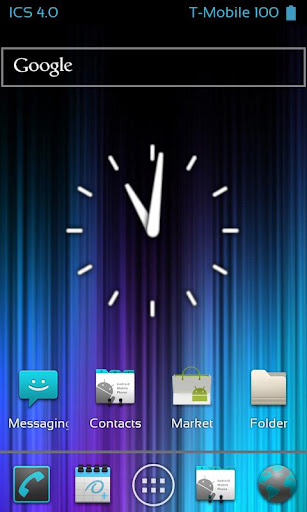
Ice Cream Sandwich Launcher is a home replacement designed to give you the look and feel of the newest Android update by Google, Android 4.0

v1.4.0.0 update:
- In-Launcher Status bar
- Full Customization
- Garden Crosshairs
- Official Clock
- Official screen indicator
- Revamped Search Bar
- Revamped screen slide & bounce
- Dock bar fix (Icon getting stuck)
- Drawer Advancement
- Preparation for next update
- WebServer integration
- Transitions throughout
- New menus and navigations

What do you get with ICS+?

★Extra features and tweaks that free users can't access
★Text color tweaks
★Font Size Tweaks
★Battery Tweaks
★The ability to change the Launcher Status bar text color
★Change the Battery Indicator Type
★No Ads or search shortcuts
★More control over the launcher and its actions

What are the main features of ICS Launcher?

★Clones Ice Cream Sandwich 4.0
★In-Launcher Status bar with ICS 4.0 Theme
★Smooth and snappy on proper devices (ask for help)
★Drag and Drop crosshairs (Garden Crosshairs)
★Easy-Gestures
★Auto-Cache Dump
★Tons of settings and features
★ICS styled folders
★Official ICS 4.0 Widget Resizing
★Official ICS 4.0 Screen indicator
★Official ICS 4.0 Wallpapers + Custom
★Official ICS 4.0 Search Bar
★Official ICS 4.0 Analog Clock
★Hide Labels on desktop and drawer
★Supports all sources of wallpapers
★Supports Live Wallpapers
★Scrollable Widgets
★Re-Sizable Widgets (Any resizable widget)
★And so much more!


What is planned for future updates?

★More Transitions
★More Widgets
★More Optimization and Fixes


Quick Tips and Help

★Click Menu to access System and Launcher settings
★Long-Click on any desktop to add items to any screen
★Swipe up to hide the notification bar on any home screen. Swipe down to bring it back.
★This Launcher may not run properly on all devices such as relatively antiquated or low-end phones!
★If you are experiencing Force Close errors, try clearing cache by pressing your menu hardware key on the homescreen, then select "manage apps" and "ICS 4.0 Launcher" under the "All" tab. Alternatively, you can uninstall and re-install the 12/20 update from the market.

Download Or Download Or Download

Download - Market

DXHome DXR v3.0.0 Apk


DXHome DXR v3.0.0 Apk | 2.9 MB | Mediafire / MirrorCreator
Requires Android:2.1 and up

Highly customizable with various themes, colorful desktop transitions, easy operating……, just like its name in Chinese, Dianxin is making the home of your Android phone colorful and enjoyable!

v3.0.0 update:
- Bug fixes

Download

DXHome DXR v3.0.0 Apk


DXHome DXR v3.0.0 Apk
Size : 2.9 MB
Requires Android:2.1 and up
Android Market Link - Visit
Developer - Visit

v3.0.0 change log:
- Bug fixes

NO.1 Play Boy
NO.2 Tempetation from pink girls~
NO.3 See you there at DXHome, BLACK, HOT girls!

Could order your app. by name or time now~
Slide your screen endlessly! That's CRAZY!
By the way, don't forget to swipe your screen,something changed, it's COOL!

INTRODUCTION
DXHome, a highly customized home replacement app., is a perfect home company with Android phones. It is created by the Dianxinos Enterpriser team in Innovation Works invested by Dr. Kaifu Lee. Highly customizable with various themes, colorful desktop transitions, easy operating……, just like its name in Chinese, Dianxin is making the home of your Android phone colorful and enjoyable!

What could you get from DXHome?
1)So many themes to enjoy!
Want your phone to change with your mood?! Try themes we designed for you!
DXHome presents its first six themes of totally different styles!
NO.1 Dianxin Default Desktop Theme--- it is peaceful, clear, warm……, all the nice feelings DXHome wants you to feel. Name it by yourself. It’s our gift~^-^~
NO.2 Midsummer Theme--- get fidgety from the hate outside? Pick some cool and fresh air here!
NO.3 Cake Theme--- are you a foody? How about some candy and cakes now~^-^~ Try it and tell us how it’s like? DXHome is “cooking” more and more for you if you like~
NO.4 Batman— a big Batman fan? Here he comes! COOL!
NO.5 Clothing— want your phone to be cute? DXHome makes suit for your icon! Try it on!
NO.6 Tree & Shadow— at the end, come and sit down beside the tree, just enjoy the peaceful nightfall now.

Not enough? Download the one you want from Internet! This the privilege Dianxin provides specially for you! With DXHome, you could always make your phone to be YOUR STYLE! Yeah, phone might be changed overtime, but your style could last forever with DXHome!

2)What is it like when you swipe your desktop screens??
Here DXHome provides you extremely smooth experience and its first series of desktop transitions! Just swipe! You will be surprised!
3)App. Drawer---Long press any icon in App Drawer, add to Home screen or delete it. Yeah, Soooo easy!
4)Screens Editor--- add, delete or remove any icon, create or edit any shortcuts to apps? It’s YOUR choice now!
By the way, don’t forget to add the weather widget designed by sweet Dianxin, both beautiful and useful!! That’s true!
5) Folder---can’t be any easier to create a new folder, just put two icons together. DXHome will create a folder automatically as you want!

There are SOOO many more than what we show you here, explore it! More surprises are waiting for you!
Keep an eye on us cause more and more are coming! DXHome will keep you being surprised!
There are SOOO many more than what we show you here, explore it! More surprises are waiting for you!
Keep an eye on us cause more and more are coming! DXHome will keep you being surprised!


Download

7 Widgets Home Plus 1.8 Apk


7 Widgets Home Plus 1.8 Apk | 938 KB | Mediafire / MirrorCreator
Requires Android:1.6 and up

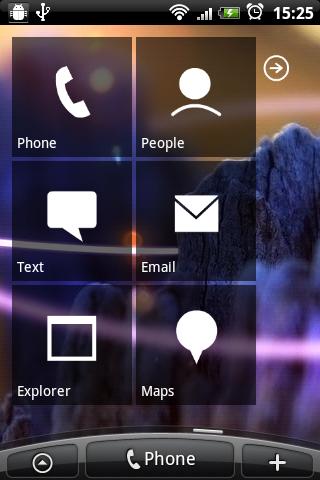
Link your phone calls history, contacts, messages, email, explorer and navigation application to a single home screen widget. The design is inspired by the Windows 7 Phone.

v1.8 update:
- HTC Sensation bug fixed

INSTRUCTIONS: Go to your home screen and press MENU > Add To Home > Widget > 7 Home Black. From the configurations form you can link your applications to widget.

This version contains all extras: Transparent Black, Green, Orange and Red Widget.

Download

Download - Market